





























Construction project management, built for real job sites.
One platform for clients, projects, and field execution.
Pillar CPM is a construction project management product developed by MADCOM Solutions. It helps contractors and project teams manage clients, track active jobs, capture field reports, control change orders, and keep project documents and history in one secure place — so the office and the field stay aligned.
Inside the product
A command center for construction operations
Pillar CPM’s interface is built for dense project data without the clutter — dark navigation for orientation, clean workspaces for focus, and status badges that make job health readable at a glance.
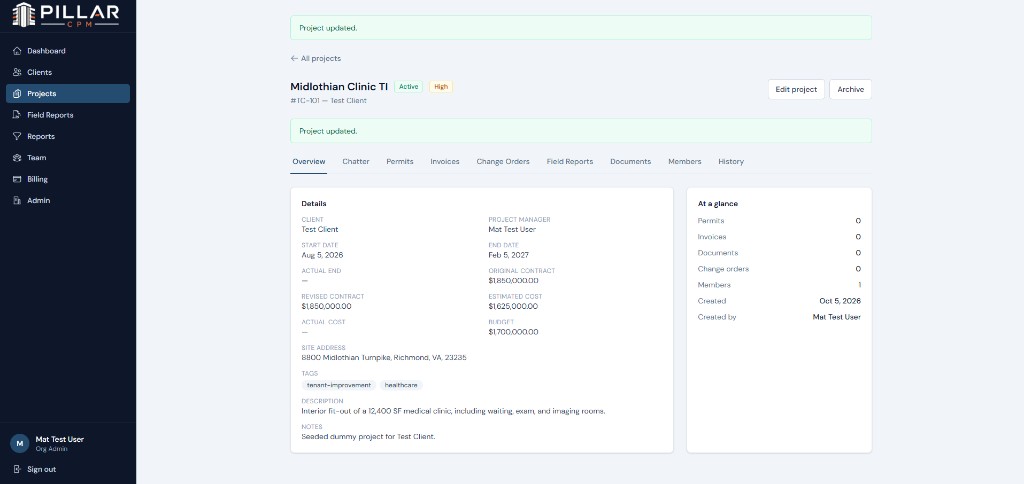
Every job starts with a clear source of truth
Project records bring schedule, financials, site details, tags, and team ownership into one overview. Status and priority badges sit next to the job name so active work is instantly recognizable.
- Contract, budget, and cost tracking in one view
- Tabbed access to Chatter, Permits, Invoices, Change Orders, Field Reports, Documents, Members, and History
- “At a glance” counts that surface module activity without digging
pillar.app / projects / midlothian-clinic-ti
pillar.app / clients / rfis
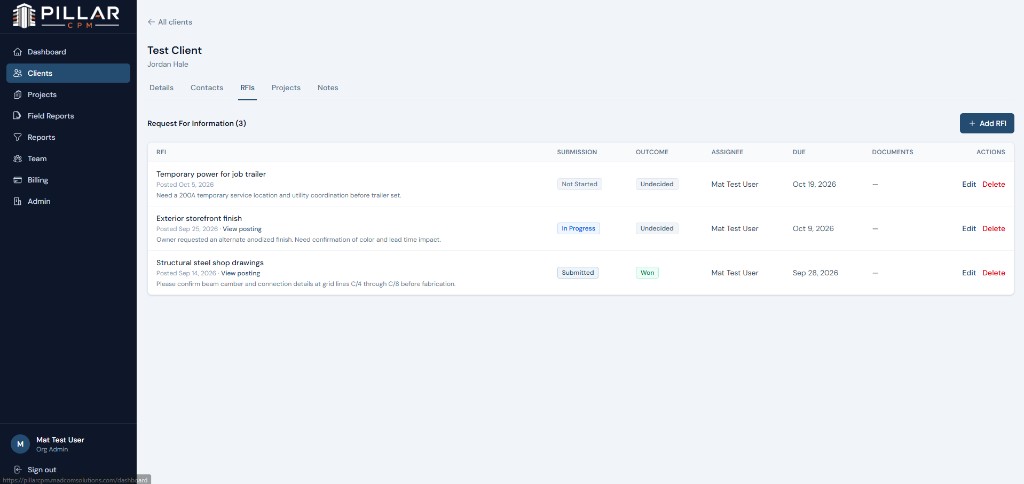
Requests that don’t get lost in inboxes
Client-level RFI tracking shows what was asked, who owns it, when it’s due, and whether it was won — with color-coded submission and outcome badges for fast scanning.
- Posting links, due dates, and assignees in one table
- Status badges for Not Started, In Progress, and Submitted
- Outcome tracking and attached supporting documents
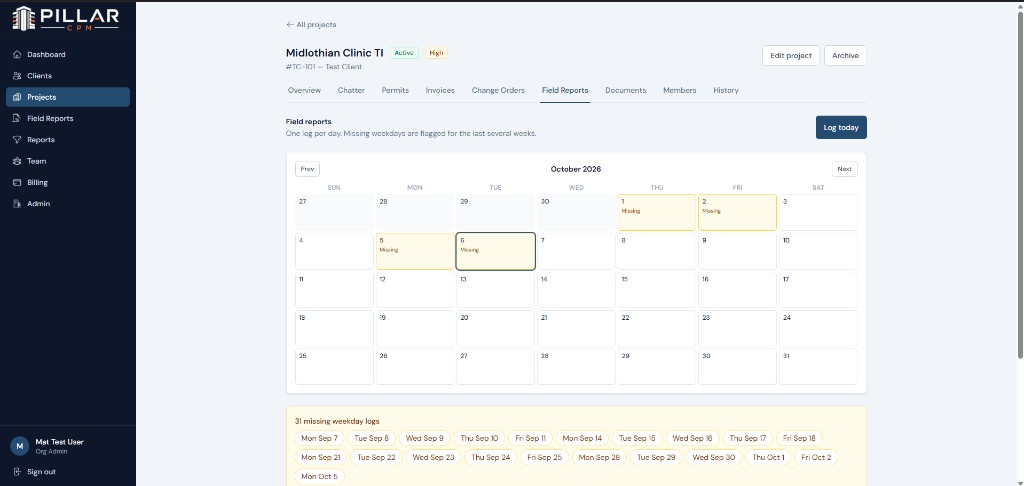
Daily logs with accountability built in
Field reporting uses a calendar view so missing weekday logs are impossible to ignore. Teams can log today, spot gaps instantly, and keep office leadership aligned with site activity.
- One log per day with missing weekday flags
- Visual calendar highlighting incomplete coverage
- Summary chips for every missing date that still needs attention
pillar.app / projects / field-reports
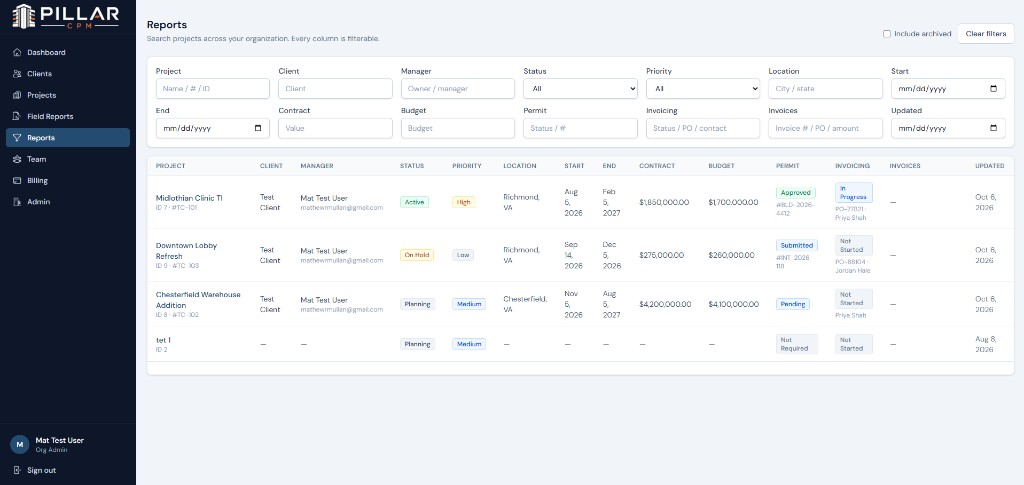
Filter every column. See the whole book of work.
Organization-wide reporting lets teams search and filter across projects by client, manager, status, priority, location, dates, contract, budget, permits, and invoicing — so leadership can answer portfolio questions without exporting spreadsheets.
- Dense, readable tables with color-coded status and priority pills
- Financial and workflow filters side by side
- Optional archived projects for historical review
pillar.app / reports
Oriented navigation
A dark sidebar keeps Dashboard, Clients, Projects, Field Reports, Reports, Team, and Billing one click away.
Status at a glance
Green, amber, and blue badges make Active jobs, High priority work, and workflow stages scannable in seconds.
Module depth without chaos
Project tabs and client tabs keep RFIs, notes, permits, invoices, and documents organized where they belong.
Built for construction teams
Pillar CPM brings structure to the work that usually lives in spreadsheets, inboxes, and disconnected tools.
Every module is designed around the data construction teams actually need to capture, review, and act on — from client intake through field execution and closeout.
Clients & Contacts
Maintain a complete client record for every owner, GC, or account your team works with.
- Company profile, primary contact, email, phone, and full address
- Multiple contacts per client with types and primary-contact designation
- Linked project history so account context stays with the relationship
Client Notes
Keep relationship and account context in one place instead of scattered email threads.
- Timestamped notes tied directly to each client
- Author and last-editor tracking for accountability
- Shared visibility for project managers and supporting team members
RFIs
Track Requests for Information from posting through resolution with clear ownership.
- Title, details, posting URL, posted date, and due date
- Assignee ownership plus submission status and outcome tracking
- Supporting RFI documents attached to each request
- Optional linkage from change orders back to the originating RFI
Projects
Run the full job record as the system of record for schedule, cost, and delivery status.
- Project number, status, priority, manager assignment, and tags
- Job site address, start/end dates, and actual completion date
- Contract value, estimated cost, actual cost, and budget
- Permit and invoicing status fields with project-level notes
- Archive controls to keep active portfolios clean without losing history
Field Reports
Capture daily field activity with the detail offices need for coordination and claims support.
- Numbered reports (FR-001 style) with log date and submission status
- Weather conditions, temperatures, wind, precipitation, and site conditions
- Work performed, general field notes, and safety incident flags/notes
- Crew, equipment, materials, visitors, and delays logged per day
- Photo attachments and addenda for follow-up corrections
Change Orders
Document scope changes with cost, schedule, approval, and supporting evidence.
- Numbered change orders with title, description, reason, and workflow status
- Cost impact, schedule impact days, and itemized cost lines by category
- Internal notes, client notes, and client approval/signature capture
- Linked RFI reference plus supporting change-order documents
- Approval history for requested, submitted, and decided milestones
Documents & Folders
Organize project files with structure, categories, and version control.
- Folder paths and structure templates for consistent project setups
- Document categories, descriptions, and original file metadata
- Automatic versioning when the same file name is uploaded again
- Uploader attribution for auditability
Permits
Track the permits that gate fieldwork and inspection readiness.
- Permit name, number, status, and issuing authority
- Issued and expiration dates
- Notes for conditions, renewals, or inspection follow-up
Invoices
Keep project billing status visible alongside delivery work.
- Invoice name, number, amount, and status
- Billing contact and PO number
- Issued, due, and paid dates with supporting notes
Project Chatter
Give teams a project-scoped conversation thread for day-to-day coordination.
- Messages tied to a specific project
- Threaded replies for focused follow-up
- Author attribution so decisions stay traceable
Team, Roles & Access
Control who can see and change what across the organization and each job.
- Roles for project managers, organization users, project-only users, and read-only access
- Project membership for scoped job visibility
- Invitations, enable/disable controls, and organization workspaces
- Passwordless email OTP login for secure access
Activity History
Maintain an audit trail of meaningful project and operational changes.
- Logged updates across key project records
- Reverse-chronological history for review and accountability
- Visibility into what changed as jobs move from kickoff to closeout
Ready to see Pillar CPM in action?
Talk with MADCOM Solutions about bringing construction project management into one platform.